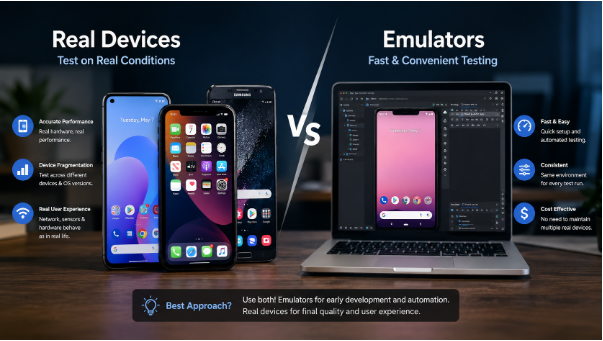
Here’s a question that trips up more teams than it should: Should you test your app on real devices or emulators?
On paper, it looks like a simple either/or. In practice, getting this wrong costs you — missed bugs before launch, frustrated users, and the kind of one-star reviews that are hard to recover from. Every mobile app development company worth its name has strong opinions on this, usually forged from painful experience. This post lays out both sides honestly, so you can make the call that actually fits your team.
First, emulators vs simulators — a quick note
These terms get used interchangeably, but they mean different things. Emulators (used for Android) replicate the actual hardware in software, running the full OS stack. Simulators (Apple’s approach for iOS) mimic the software environment without replicating hardware behavior.
For practical purposes, most developers call them both “emulators,” and that’s the convention here.
Both have improved enormously. Android Emulator’s Snapdragon-based images and Xcode’s iOS 17+ simulators are genuinely fast and capable. They’re not the sluggish, crash-prone tools they were five years ago. That said, fast and capable doesn’t mean sufficient.
Where emulators genuinely shine
The feedback loop is unbeatable
Emulators spin up in seconds. They run for free. And on a modern CI/CD pipeline, you can run 200 tests across 10 different OS and screen configurations simultaneously — something that would require a serious device lab to replicate with physical hardware.
For teams shipping multiple times a day, this speed is non-negotiable. Waiting 45 minutes for a physical device test run to gate a deployment isn’t sustainable.
Early development is made for emulators
When you’re still iterating on layouts, tweaking API integrations, or building out core business logic, emulators are exactly the right tool. You need a fast loop. You need to reproduce a specific screen size or Android version on demand. You don’t need to be managing a charging rack of test phones at that stage.
Consistency catches regressions
Emulators don’t have low batteries, cracked screens, or seventeen background apps eating RAM. The environment is the same every single run. That consistency is powerful for regression detection — if a test fails on an emulator, it’s almost always a code problem, not an environment problem.
OS coverage at scale
Say your app needs to support Android 10 through 14 across Samsung, Pixel, and OnePlus devices. Spinning up emulators for each configuration takes minutes. Maintaining that physical device matrix costs real money and real shelf space.
Where emulators will leave you exposed
This is where mobile app testing on real hardware earns its place. There’s a category of bug that simply doesn’t exist in emulated environments.
Performance is the obvious one. A 60fps animation that looks buttery on a Mac M3 can drop frames on a mid-range Android phone from 2021 running on a warm battery. Emulators borrow your laptop’s resources, so the numbers you see won’t match what your users experience on a three-year-old phone.
Sensors and hardware peripherals can’t be faked. GPS, accelerometer, gyroscope, NFC, Bluetooth — the APIs exist in emulators, but real-world behavior is something else entirely. A fitness app that tracks runs or a payment app using NFC has to be tested on real hardware. There’s no way around it.
Carrier networks are a different beast. Real devices on cellular connections experience latency spikes, packet loss, and carrier-specific quirks. An emulator on your office Wi-Fi won’t surface the timeout bug that hits users on 4G in a building with poor signal.
Thermal throttling is real. Phones heat up under sustained load. A map app or a game that performs perfectly at launch can degrade noticeably after 20 minutes of use. Emulators don’t throttle. Your users’ devices do.
OEM customizations bite harder than you’d expect. Samsung One UI, Xiaomi MIUI, and other Android skins handle permissions, background processes, and UI rendering differently from stock Android. Those differences only appear on the actual devices.
Real devices: what they give you that nothing else can
The bugs that matter most
Touch input at the edges of curved screens. Notification shade interactions during a critical flow. Keyboard behavior on a specific OEM build. Haptic feedback timing. These things require physical hardware to validate — full stop.
The experience of actually using your app
No automated test report tells you that the primary action button is just slightly too low for comfortable thumb reach. Or that the white background looks fine on a desktop monitor but washes out in direct sunlight on an OLED screen. Real-device testing finds friction that emulators make invisible.
Performance numbers that mean something
Render times, frame drops, memory pressure — the figures you get from real hardware are the figures your users actually experience. Emulator profiling gives you a directional signal. Real devices give you ground truth.
Device farms: the practical middle ground
Not every team can maintain an in-house device lab — and most shouldn’t try. Cloud-based device farms like Firebase Test Lab, BrowserStack App Automate, and AWS Device Farm give you access to hundreds of real devices on demand.
Tests run remotely. Results come back with logs, screenshots, and video recordings. You get real hardware fidelity without the shelf space or the maintenance.
The tradeoff is cost. Device farm minutes add up, especially at scale. And feedback loops are slower than a local emulator run. But for pre-release testing and wide-device-matrix coverage, they’re often the most practical option outside of a large QA team.
A strategy that actually works in practice
The teams that consistently ship stable apps don’t pick one tool. They layer them:
| Stage | Tool | Purpose |
| Unit & integration tests | Emulator / CI | Fast feedback, regression catching |
| UI automation (smoke) | Emulator | Core flows on standard screen sizes |
| UI automation (full) | Device farm | Multi-device, multi-OS matrix |
| Performance testing | Real device | Frame rates, memory, thermal behavior |
| Exploratory / UAT | Real device | Human validation before release |
The balance shifts with your app type. A simple utility app can lean heavily on emulators. Anything with sensors, hardware integrations, or real-time performance requirements needs substantially more real-device coverage.
Four questions to calibrate your own approach
Where are your users actually? If 60% of your installs come from three device models, own those three devices physically. If you’re supporting a fragmented Android base, emulators and a device farm are more practical than trying to maintain every variant.
How often are you shipping? Multiple daily deployments need the speed of emulators for CI gates. Real devices belong in scheduled nightly runs and pre-release validation.
What’s the cost of a production bug? A fintech app or a healthcare tool has a different risk profile than a casual game. Higher stakes mean more real-device coverage is worth the investment.
How big is your team? Small teams get significant value from three well-chosen physical devices — a flagship iPhone, a mid-range Android, and one older Android model — plus emulators for everything else. You don’t need a device lab to do this well.
The bottom line
Emulators and real devices solve different problems. Picking one and ignoring the other is how teams get blindsided by launch-day bugs that “never showed up in testing.”
Emulators win on speed, cost, and coverage breadth. Real devices win on fidelity, hardware accuracy, and catching the bugs that will actually reach your users. The teams that ship reliable apps have figured out how to use both — at the right stage, for the right reasons.



Leave a Reply