Introduction
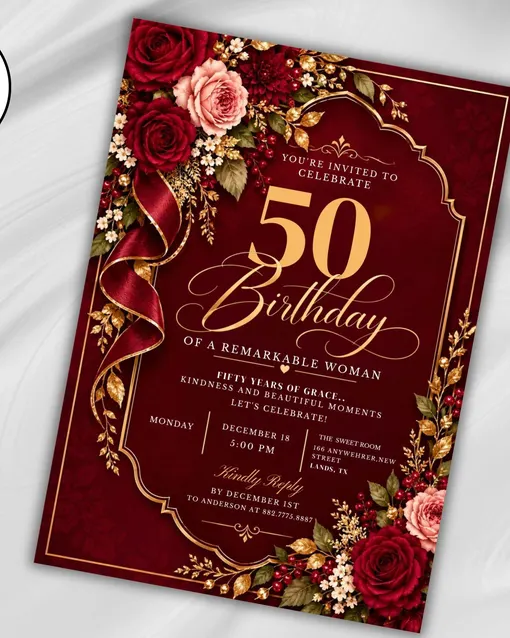
Turning fifty is a big deal, and the first thing your guests see should say so. A 50th Birthday Invitation isn’t just a card with a date on it. It’s the opening line of the whole party. Burgundy, gold, blush roses and a little ribbon bow tell people the night will feel warm and a bit dressy before they even read the address.
Here’s what the design looks like, what’s inside the file, how the personalizing works, and the small things that trip people up before they hit print.
Why Turning Fifty Deserves a Proper Invitation
Fifty lands differently than most birthdays. Nobody’s counting candles for the cake’s sake. People are marking half a century, and they usually want it to feel a little special. Your invitation is the first hint of that. A quick text works for a casual barbecue, sure, but a milestone asks for more. Guests hang on to a good invite, tuck it on the fridge, and show up already in the mood. That’s why color, lettering and layout matter more than they seem to.
A theme helps, too. Fifty & Fabulous is a phrase people get instantly. It says the mood is glamorous and celebratory, not a pile of over-the-hill jokes. If you want a refresher on wording and formality, Emily Post’s etiquette guides are a reliable place to start. Then you can match the tone of your text to the look of the card, so everything feels like one idea instead of three.
What You Get With the Burgundy and Gold Floral Design
Picture a rich burgundy background with deep red flowers, soft blush roses and delicate golden botanical details. A thin gold arch frames the center, and an elegant gold ribbon bow adds the finishing touch. That’s the look of this 50th Birthday Invitation, and it leans glamorous without being loud.
It suits a quiet birthday dinner just as well as a formal evening or a full party with a dance floor. Honestly, the color story does a lot of the talking. The file covers more than one format. You get a 5 × 7 inch invitation, a coordinating mobile-friendly version for texting or messaging, and matching versions for paper and screen. So you can mail cards to your aunts and still ping the group chat for everyone else.
The design comes from Party In Style USA, a small Florida-based Etsy shop whose owner describes her style as classy with a touch of fun. It’s a new shop, but it already holds a 5.0 rating across nine reviews, and buyers mention fast downloads and easy updating.
How the Personalizing Works, Step by Step
Nobody wants a design project that needs software lessons. Here, the whole thing runs through Canva, and a free account is all you need. You don’t install anything or hunt for fonts. You buy the listing, grab one PDF, and click the Canva link inside it.
From there it’s mostly typing over the sample text. Most people finish in about the time it takes to drink a coffee, and that’s with fussing over line breaks. The order goes like this. After checkout, you download the PDF that holds your template link. Click it, and the invitation opens in your Canva account.
Swap in the guest of honor’s name, the date, time, location, RSVP details and anything else the party needs. When you like what you see, download the result as a PDF or JPG. It’s a fully editable template in the way that counts: every word on the card can change, and you can redo it as many times as you like before sending.
What You Can Change and What Stays Put
Here’s the part worth reading before you buy, because it saves disappointment later. The template lets you change text, fonts and text colors. That’s it. The artwork itself, meaning the flowers, the gold arch and the ribbon bow, is locked in place.
For most people that’s a feature rather than a flaw, since the design stays polished no matter what you type. But if you were hoping to swap roses for lilies, this isn’t the one. A few other rules apply. It’s a digital product only, so nothing physical ships to your door. The design is for personal use, which means you can’t copy it, share it around, or resell it in any form.
All designs carry a 2026 copyright from the shop. Colors may also look a bit different on paper than on your screen, because every monitor and printer interprets them differently. Deep shades like burgundy are especially prone to that, so don’t panic if the first test print looks slightly darker or lighter.
Wording, Timing and Printing Without the Stress
Good invitation wording is short. Guests need to know who’s celebrating, when it starts, where to go, and how to say yes. That’s about it. Add a dress hint if you like, say “cocktail attire” or “wear your sparkle,” since the gold-and-burgundy look practically asks for it.
For the reply line, spell out how to RSVP, whether that’s a phone number, an email or a text, and add a reply-by date so you’re not chasing people the week of. When it’s time to send, you’ve got choices. A PDF is the safer pick for paper, and a JPG is easier to drop into a message. Because it’s a printable file, you can run a single test copy at home before committing to the whole stack.
If the color doesn’t please you, a professional print shop is the next step, and many people prefer that for a formal party. A common rule of thumb is to get invitations out three to four weeks ahead, though a big dinner or travelling guests may call for more notice.
Price, Delivery and Buyer Protection
The listing went up on November 3, 2026. At the time of writing it’s priced at $4.61, down from $6.98, which is a 34% discount. Sales like that can end, so check the current price on the page. Payment options include PayPal, Visa, Mastercard, Discover, Apple Pay, Klarna, and Etsy gift cards or credits.
Since this is an instant digital download, your file becomes available as soon as payment is confirmed. Etsy explains how that works in its instant download help article. Because the product is delivered instantly, the shop doesn’t accept returns, exchanges or cancellations.
That’s standard for downloads, but it means you should read the details first, especially the part about what’s editable. If something goes wrong, message the seller directly. Purchases are also covered by Etsy Purchase Protection when they’re eligible, which is a nice safety net when you’re buying from a newer shop.
Frequently Asked Questions
Do I need to pay for Canva?
No. A free Canva account is enough to open the link and personalize the text. You won’t need to install any software.
Can I change the flowers or the gold ribbon?
No. Only the text, fonts and text colors can be customized. The artwork and graphic elements are fixed.
Can I print it at home?
Yes. Download your finished design as a PDF or JPG, then print it at home or through a professional printer. Printed colors may vary slightly from what you see on screen.
Can I send it digitally instead of printing?
Absolutely. The file includes a coordinating mobile-friendly version, so you can send it through text or messaging apps.
Can I use the design for my business or resell it?
No. It’s licensed for personal use only, and copying, sharing or reselling it in any form isn’t allowed.
Conclusion
A milestone like fifty only comes around once, so the invitation shouldn’t feel like an afterthought. This burgundy and gold floral 50th Birthday Invitation gives you a polished starting point without needing design skills. Personalize the wording in Canva, test your colors, pick paper or screen, and you’re done.
Add the Fifty & Fabulous spirit to your party plans, and your guests will arrive knowing it’s going to be a good one. Why not get the invite out the door and start on the fun part?


Leave a Reply